domingo, 18 de junio de 2023

create user with remote access

To create a MySQL user called "admin" with the password "asterisk" and grant all privileges to the "asterisk" database, as well as allow remote MySQL connections, follow these steps:

  1. Log in to the MySQL server as the root user:

    css
    mysql -u root -p
  2. Enter the MySQL root password when prompted.

  3. Create a new user "admin" with the password "asterisk":

    sql
    CREATE USER 'admin'@'%' IDENTIFIED BY 'asterisk';

    This creates a user named "admin" that can connect from any remote host ("%").

  4. Grant all privileges to the user on the "asterisk" database:

    sql
    GRANT ALL PRIVILEGES ON asterisk.* TO 'admin'@'%';
  5. Flush the privileges to apply the changes:

    sql
    FLUSH PRIVILEGES;

Allow remote connection

nano my.cnf.d/mariadb-server.cnf


[mysqld]

datadir=/var/lib/mysql

socket=/var/lib/mysql/mysql.sock

log-error=/var/log/mariadb/mariadb.log

pid-file=/run/mariadb/mariadb.pid

bind-address=0.0.0.0


Restart the service

 systemctl restart mysqld


TEST

 mysql -h 145.27.107.195 -u admin -pasterisk

lunes, 13 de febrero de 2023

How to Allow Remote Connections to MySQL

sudo nano /etc/mysql/mysql.conf.d/mysqld.cnf


1.2 Change Bind-Address IP

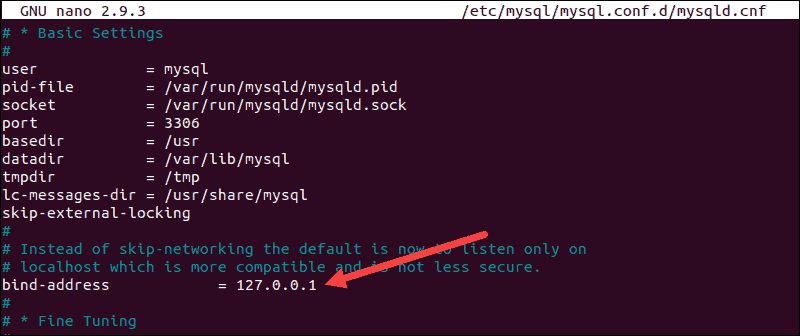
You now have access to the MySQL server configuration file. Scroll down to the bind-address line and change the IP address. The current default IP is set to 127.0.0.1. This IP limits MySQL connections to the local machine.

Location of the bind-address line in the MySQL config file.

The new IP should match the address of the machine that needs to access the MySQL server remotely. For example, if you bind MySQL to 0.0.0.0, then any machine that reaches the MySQL server can also connect with it.

Once you make the necessary changes, save and exit the configuration file.

Note: Remote access is additionally verified by using the correct credentials and user parameters you have defined for your MySQL users.

1.3 Restart MySQL Service

Apply the changes made to the MySQL config file by restarting the MySQL service:

sudo systemctl restart mysql

Next, your current firewall settings need to be adjusted to allow traffic to the default MySQL port.

Step 2: Set up Firewall to Allow Remote MySQL Connection

While editing the configuration file, you probably observed that the default MySQL port is 3306. 

https://phoenixnap.com/kb/mysql-remote-connection

viernes, 10 de febrero de 2023

MySQL Error-The Server Requested An Authentication Method Unknown To The Client

1 - CREATE USER 'admin'@'%' IDENTIFIED BY '91224YB11111';

2 - GRANT ALL ON *.* TO 'admin'@'%';

3- ALTER USER 'admin'@'%' IDENTIFIED WITH mysql_native_password BY '91224YB11111';

3 - FLUSH PRIVILEGES;

https://www.skynats.com/blog/mysql-error-the-server-requested-authentication-method-unknown-to-the-client/

lunes, 15 de agosto de 2022

use this for create an user on MYSQL 8

 CREATE DATABASE IF NOT EXISTS android

CREATE USER 'user'@'localhost' IDENTIFIED BY 'P@ssW0rd';

GRANT ALL ON *.* TO 'user'@'localhost';

FLUSH PRIVILEGES;


domingo, 17 de abril de 2022

Order a MySQL table by two columns


Default sorting is ascending, you need to add the keyword DESC to both your orders:

ORDER BY article_rating DESC, article_time DESC

https://stackoverflow.com/questions/514943/order-a-mysql-table-by-two-columns

$query = " select * from  users where price like '%$_GET[par]%' or  info like '%$_GET[par]%' or keyword  like '%$_GET[par]%' order by price,  id desc";

martes, 26 de octubre de 2021

MYSQL display duplicated values

SELECT      list_phone,list_name,COUNT(list_phone) FROM     lists where list_name='4thbatch-phoneonly' GROUP BY list_phone HAVING COUNT(list_phone) > 1;


| 9896652563 | 4thbatch-phoneonly |                 3 |

| 9896895556 | 4thbatch-phoneonly |                 3 |

| 9897435168 | 4thbatch-phoneonly |                 3 |

| 9897529384 | 4thbatch-phoneonly |                 2 |

| 9898399391 | 4thbatch-phoneonly |                 4 |

| 9898457427 | 4thbatch-phoneonly |                 2 |

| 9898766241 | 4thbatch-phoneonly |                 2 |

| 9898927972 | 4thbatch-phoneonly |                 3 |

+------------+--------------------+-------------------+

1943 rows in set (0.10 sec)


https://www.mysqltutorial.org/mysql-find-duplicate-values/


martes, 31 de agosto de 2021

subqueries

 SELECT (SELECT COUNT(*) FROM campaigns) as Campaigns, (SELECT COUNT(DISTINCT(list_name)) FROM lists where list_name!='TESTLOCAL' ) as list


You can do it by using subqueries, one subquery for each tableCount :

SELECT
  (SELECT COUNT(*) FROM table1 WHERE someCondition) as table1Count, 
  (SELECT COUNT(*) FROM table2 WHERE someCondition) as table2Count,
  (SELECT COUNT(*) FROM table3 WHERE someCondition) as table3Count

https://stackoverflow.com/questions/3761240/count-from-multiple-tables-in-mysql